The newest version of Dont Text is updated and optimized for the latest version of iOS 26.
What’s New in Version 2.5
Dont Text version 2.5 includes a refreshed design that is easier to navigate, bug fixes for restoring and managing your subscription, and the ability to block texts by area code.
Design Refresh
This lastest update includes a design refresh that makes Dont Text easier to use and navigate.
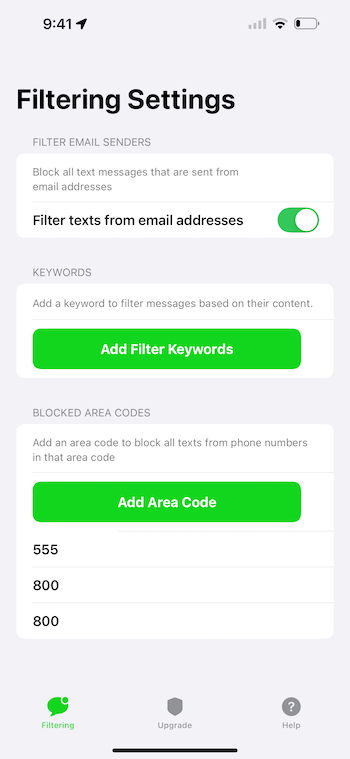
On the filtering tab, the UI has been updated to make it simple to add keywords and area codes to filter text messages.
The Worry Free Filtering page has been overhauled to make it easy to understand what is included in your subscription and makes it easy to find everything you need to manage your subscription.
Finally, the help tab has been simplified with easy to follow instructions on how to enable text filtering on your device.
Bug Fixes
Some users experienced issues restoring their subscriptions. The latest update includes fixes to resolve issues that users were having while managing and restoring their subscription purchases.
Block Spam Texts by Area Code
The latest version of Dont Text supports blocking spam texts by the sender’s area code.
To get started, open the app and navigate to the Filtering tab. Click the button to add an area code and enter a 3 digit area code and click Add. You can add as many area codes as you’d like.
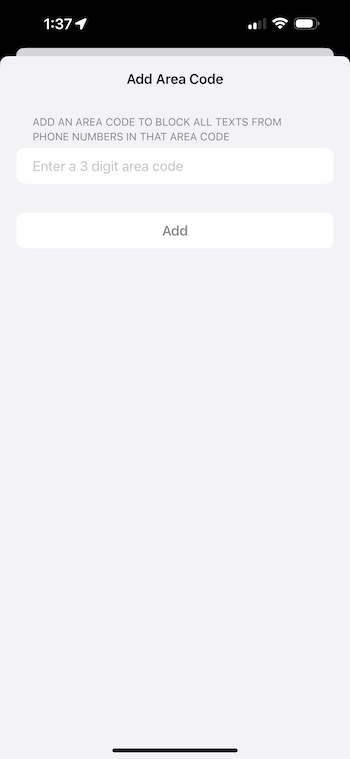
After adding area codes to the app, Dont Text will block any incoming text messages that are sent from the area codes you’ve entered.
Download Dont Text
The latest version of Dont Text is now available on the App Store. Download Dont Text from the App Store.